Notepad: A Playful Display Font for Creative Projects
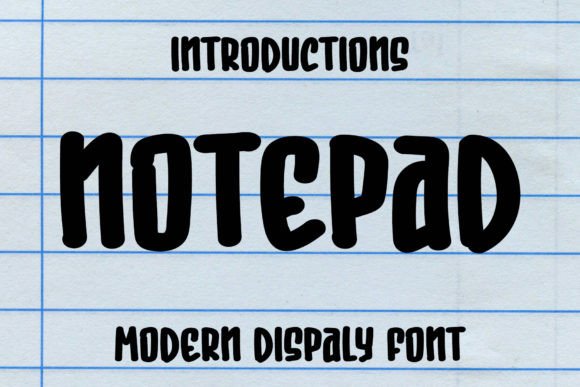
Looking for a font that brings instant joy and personality to your designs? Meet Notepad, a fun and quirky display typeface that’s all about cheerful energy. It’s the kind of creative font that can transform a simple layout into something memorable, especially when you’re working on projects aimed at children or families. With its friendly, approachable style, Notepad is designed to stand out while keeping things light and engaging.
This isn’t just another script font or handwritten font—it’s a premium display font crafted for specific design needs. Its character is playful without being overly childish, making it versatile for a range of cheerful themes. Whether you’re designing a birthday invitation, a kids’ menu, or playful social media graphics, this typeface sets the right tone. The letterforms are balanced and readable, even at larger sizes, which is crucial for effective display typography.
Where Can You Use the Notepad Font?
Think about any project where you want to evoke happiness, creativity, or a sense of fun. Notepad shines in scenarios like:
- Logo Design & Brand Identity: Perfect for brands targeting a young audience or those wanting a whimsical, approachable image. It helps build instant recognition with its unique style.
- Packaging & Product Design: Makes children’s products, snacks, or craft items pop off the shelf. Pair it with bright colors for maximum impact.
- Poster & Editorial Design: Ideal for event posters, magazine headlines, or book covers that need a burst of personality. It grabs attention without overwhelming the viewer.
- Digital & Web Design: Use it for website headers, app interfaces, or digital invitations to create a welcoming and modern user experience.
- Merchandise & Apparel: Great for t-shirts, tote bags, or stickers where a fun, hand-drawn aesthetic is desired.
One of the standout features of this creative font is its PUA encoding. This means you have easy access to all the beautiful glyphs, alternates, and ligatures it offers. No special software is needed—just install and use the character map to explore and incorporate these extra flourishes into your work. This design flexibility allows you to add unique touches to headlines or logos, ensuring your typography feels custom and polished.
Tips for Choosing and Using This Typeface
When considering a premium font like Notepad for your next project, keep a few practical things in mind. First, always test readability. While it’s a display font, it should still be legible in its intended context, especially for shorter text blocks like logos or headlines. Second, consider the mood. Does its quirky, handwritten vibe align with your project’s overall message? It’s a fantastic match for positive, energetic themes but might not suit formal or corporate contexts.
Font pairing is another key step. Notepad works beautifully with clean, simple sans-serif fonts for body text, creating a nice contrast that guides the viewer’s eye. Think of pairing it with a neutral typeface for longer descriptions to maintain clarity. Also, review the full character set before purchasing. Knowing what alternates and ligatures are available helps you plan how to use the font creatively from the start.
Finally, ensure the font license fits your needs. Whether it’s for a personal project or a commercial client, understanding the usage rights is essential for a smooth design process. The right font does more than just look good—it strengthens visual consistency, boosts brand recognition, and elevates the professional presentation of your work. Choosing a well-designed typeface like Notepad is an investment in the quality and impact of your creative assets, helping you deliver designs that feel both polished and full of character.